> ## Documentation Index
> Fetch the complete documentation index at: https://docs.dalus.io/llms.txt
> Use this file to discover all available pages before exploring further.
# Version Control
> Create, manage, and restore model snapshots to track changes over time
Dalus provides built-in version control through snapshots. Create point-in-time backups of your model, then restore to any previous state when needed.
## What Snapshots Capture
A snapshot preserves your complete model state:
| Element | Included |
| ------------------------ | --------------------------------------- |
| **Parts** | All parts with attributes and hierarchy |
| **Ports** | Port definitions and connections |
| **Interfaces** | Interface definitions and flows |
| **Requirements** | All requirements with custom fields |
| **States & Transitions** | Behavior model structure |
| **Actions** | Action scripts and code |
| **Documents** | Attached files in the Documents Hub |
| **Visualizations** | Saved diagram views |
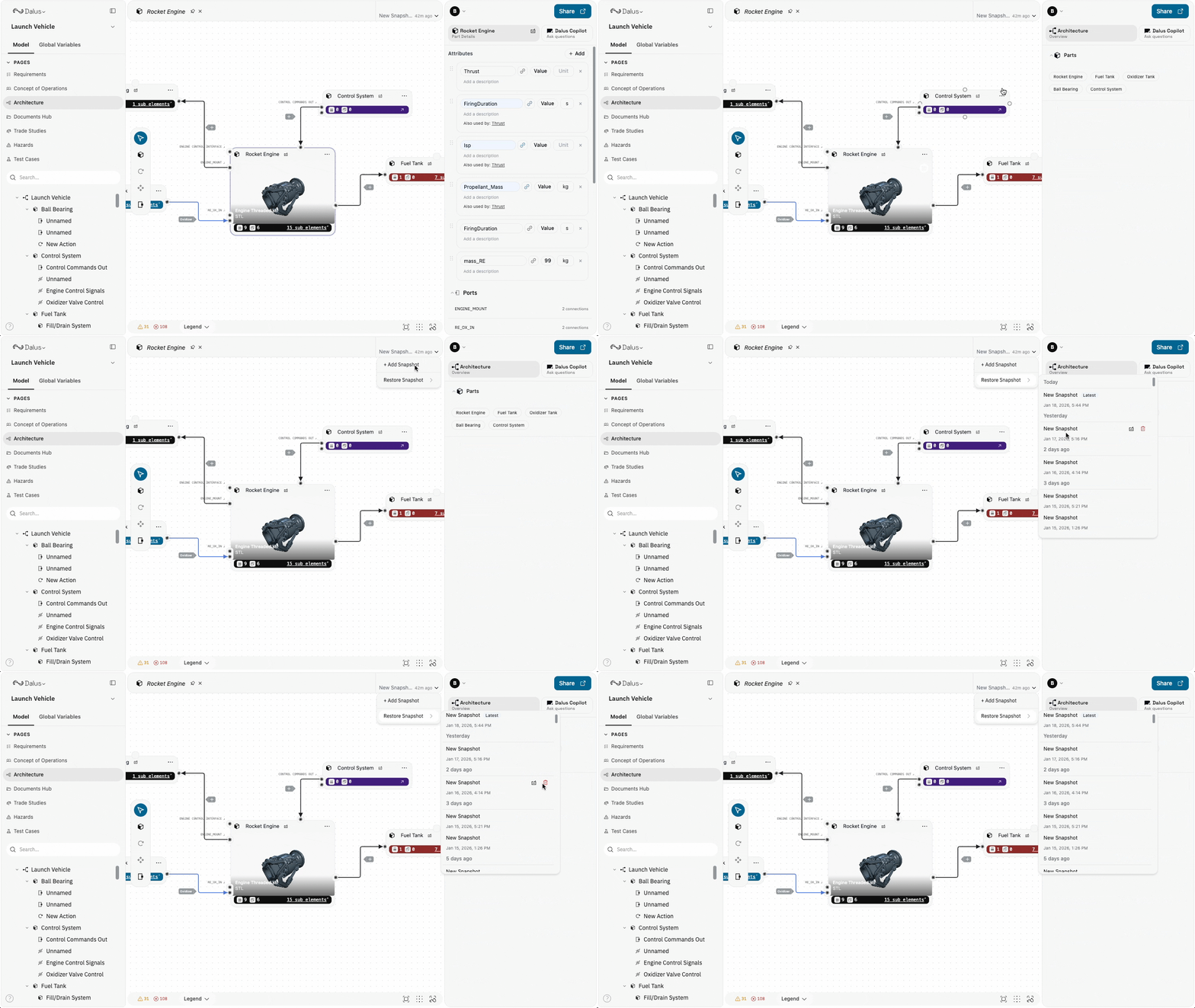
## Accessing Snapshots
The snapshot manager is located in the model header toolbar:
1. Open your model
2. Click the **clock icon** in the tab header
3. The snapshot dropdown shows your version history
Snapshots are organized by time period:
* **Today**
* **Yesterday**
* **Last 7 days**
* **Last 30 days**
* **Older**
 ## Creating Snapshots
Create a snapshot to save the current state of your model before making significant changes.
1. Click the **clock icon** in the tab header
2. Click **New Snapshot**
3. Optionally enter a descriptive name (e.g., "Before restructure" or "CDR baseline")
4. Press **Enter** or click the checkmark to confirm
Give snapshots meaningful names that describe the model state or milestone. This makes it easier to find the right version when you need to restore.
### When to Create Snapshots
Create snapshots before:
* Major architectural changes
* Deleting parts or requirements
* Design reviews or milestones
* Experimenting with different approaches
* Handing off to another team member
## Restoring Snapshots
Restore your model to a previous snapshot state.
1. Click the **clock icon** in the tab header
2. Find the snapshot you want to restore
3. Click the **restore icon** on that snapshot
4. Confirm the restore in the dialog
Restoring a snapshot replaces your current model state. Any changes made since the selected snapshot will be lost. Consider creating a new snapshot of your current state before restoring.
### What Happens During Restore
When you restore a snapshot:
* All model elements are replaced with the snapshot version
* Documents and files are restored
* Action scripts are restored
* The current state is overwritten (not merged)
## Managing Snapshots
### Rename a Snapshot
1. Click the **clock icon** to open the snapshot dropdown
2. Click the **edit icon** on the snapshot you want to rename
3. Enter the new name
4. Press **Enter** to save
### Delete a Snapshot
1. Click the **clock icon** to open the snapshot dropdown
2. Click the **delete icon** on the snapshot you want to remove
3. The snapshot is permanently deleted
Deleting a snapshot is permanent and cannot be undone. The snapshot data is removed from storage.
## Automatic Snapshots
Dalus may create automatic snapshots in certain situations:
* **Copilot checkpoints** — Created before AI-assisted changes so you can revert if needed
* **Migration backups** — Created during system updates
These internal snapshots are hidden from the snapshot list but can be used for recovery if needed.
## Best Practices
1. **Snapshot before major changes** — Always create a named snapshot before restructuring your architecture or deleting significant content.
2. **Use descriptive names** — Names like "Pre-CDR baseline" or "Before port refactor" are more useful than timestamps alone.
3. **Regular checkpoints** — Create snapshots at natural milestones—end of day, before reviews, after completing features.
4. **Don't rely solely on snapshots** — For formal version control, also use [Model Export](/feature-guides/import-export-model) to create external backups.
5. **Clean up old snapshots** — Delete snapshots you no longer need to keep your history manageable.
## Permissions
Snapshot management follows model permissions:
| Role | Create | Restore | Delete | Rename |
| ---------- | ------ | ------- | ------ | ------ |
| **Owner** | ✓ | ✓ | ✓ | ✓ |
| **Admin** | ✓ | ✓ | ✓ | ✓ |
| **Editor** | ✓ | ✓ | ✓ | ✓ |
| **Viewer** | — | — | — | — |
Viewers cannot access the snapshot manager. Only team members with edit permissions can create, restore, or manage snapshots.
## Creating Snapshots
Create a snapshot to save the current state of your model before making significant changes.
1. Click the **clock icon** in the tab header
2. Click **New Snapshot**
3. Optionally enter a descriptive name (e.g., "Before restructure" or "CDR baseline")
4. Press **Enter** or click the checkmark to confirm
Give snapshots meaningful names that describe the model state or milestone. This makes it easier to find the right version when you need to restore.
### When to Create Snapshots
Create snapshots before:
* Major architectural changes
* Deleting parts or requirements
* Design reviews or milestones
* Experimenting with different approaches
* Handing off to another team member
## Restoring Snapshots
Restore your model to a previous snapshot state.
1. Click the **clock icon** in the tab header
2. Find the snapshot you want to restore
3. Click the **restore icon** on that snapshot
4. Confirm the restore in the dialog
Restoring a snapshot replaces your current model state. Any changes made since the selected snapshot will be lost. Consider creating a new snapshot of your current state before restoring.
### What Happens During Restore
When you restore a snapshot:
* All model elements are replaced with the snapshot version
* Documents and files are restored
* Action scripts are restored
* The current state is overwritten (not merged)
## Managing Snapshots
### Rename a Snapshot
1. Click the **clock icon** to open the snapshot dropdown
2. Click the **edit icon** on the snapshot you want to rename
3. Enter the new name
4. Press **Enter** to save
### Delete a Snapshot
1. Click the **clock icon** to open the snapshot dropdown
2. Click the **delete icon** on the snapshot you want to remove
3. The snapshot is permanently deleted
Deleting a snapshot is permanent and cannot be undone. The snapshot data is removed from storage.
## Automatic Snapshots
Dalus may create automatic snapshots in certain situations:
* **Copilot checkpoints** — Created before AI-assisted changes so you can revert if needed
* **Migration backups** — Created during system updates
These internal snapshots are hidden from the snapshot list but can be used for recovery if needed.
## Best Practices
1. **Snapshot before major changes** — Always create a named snapshot before restructuring your architecture or deleting significant content.
2. **Use descriptive names** — Names like "Pre-CDR baseline" or "Before port refactor" are more useful than timestamps alone.
3. **Regular checkpoints** — Create snapshots at natural milestones—end of day, before reviews, after completing features.
4. **Don't rely solely on snapshots** — For formal version control, also use [Model Export](/feature-guides/import-export-model) to create external backups.
5. **Clean up old snapshots** — Delete snapshots you no longer need to keep your history manageable.
## Permissions
Snapshot management follows model permissions:
| Role | Create | Restore | Delete | Rename |
| ---------- | ------ | ------- | ------ | ------ |
| **Owner** | ✓ | ✓ | ✓ | ✓ |
| **Admin** | ✓ | ✓ | ✓ | ✓ |
| **Editor** | ✓ | ✓ | ✓ | ✓ |
| **Viewer** | — | — | — | — |
Viewers cannot access the snapshot manager. Only team members with edit permissions can create, restore, or manage snapshots.