> ## Documentation Index
> Fetch the complete documentation index at: https://docs.dalus.io/llms.txt
> Use this file to discover all available pages before exploring further.
# Full Model
> Export your complete model to HTML, PDF, or SysML v2 format
Export your complete Dalus model for documentation, sharing with stakeholders, or interoperability with other MBSE tools.
## Accessing Model Export
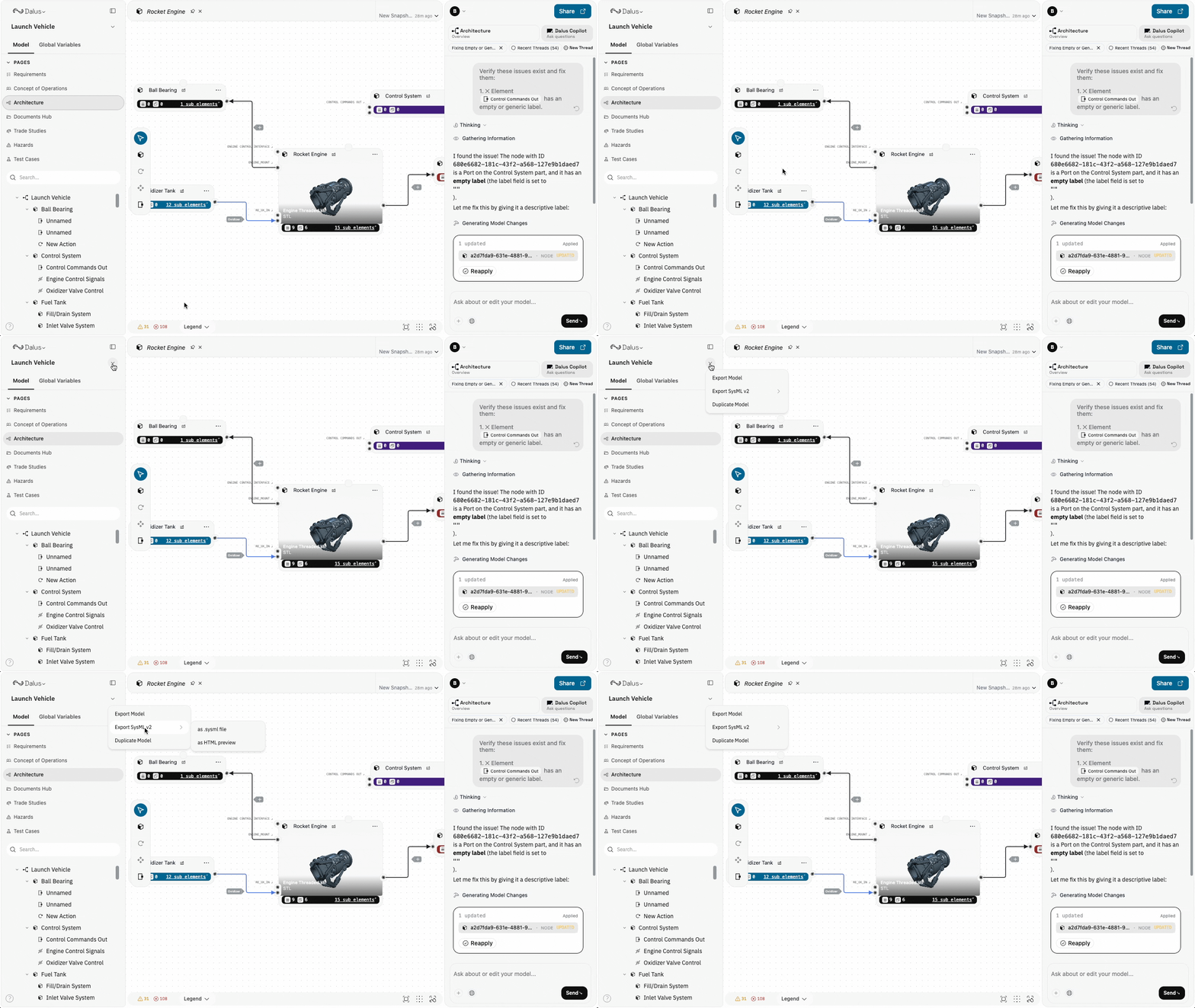
Model export options are available from the model header dropdown:
1. Click the **dropdown arrow** next to your model name in the left sidebar
2. Select your desired export option
 ## Export Options
### Export Model (HTML/PDF)
Generate a formatted HTML document of your complete model, which can be saved as PDF for formal documentation.
1. Click the model name dropdown
2. Select **Export Model**
3. The HTML document opens in a new tab
4. Use your browser's **Print** or **Save as PDF** function to create a PDF
The export includes:
| Section | Contents |
| ---------------- | --------------------------------------- |
| **Requirements** | Full requirements table with all fields |
| **Parts** | System hierarchy with attributes |
| **Ports** | Port definitions and connections |
| **Interfaces** | Interface definitions and flow types |
| **States** | State machine definitions |
| **Actions** | Action scripts and triggers |
Use HTML/PDF export for design reviews, compliance documentation, or sharing with stakeholders who don't have Dalus access.
### Export to SysML v2
Export your model in SysML v2 textual notation for interoperability with other MBSE tools.
#### Export as .sysml File
1. Click the model name dropdown
2. Select **Export SysML v2 > as .sysml file**
3. A `.sysml` file downloads to your machine
The SysML v2 export generates valid textual SysML including:
* Package structure with your model name
* Part definitions with attributes
* Port definitions with directions
* Interface connections
* Requirements linked to system elements
SysML v2 export uses standard SI and ISQ unit libraries. The generated code follows the SysML v2 specification and can be imported into compatible tools.
#### Export as HTML Preview
View your SysML v2 code in a formatted HTML page with syntax highlighting:
1. Click the model name dropdown
2. Select **Export SysML v2 > as HTML preview**
3. The formatted SysML code opens in a new tab
This is useful for:
* Reviewing the SysML structure before sharing
* Copying specific sections of SysML code
* Creating documentation with embedded SysML snippets
## Best Practices
1. **Export before major changes** — Create an HTML/PDF snapshot before restructuring your model to preserve a record of the previous state.
2. **Use SysML v2 for tool interoperability** — When sharing models with teams using other MBSE tools, SysML v2 provides the best format compatibility.
3. **Include in documentation packages** — PDF exports work well for milestone reviews, CDRs, and compliance documentation.
4. **Version your exports** — Include dates or version numbers in exported file names to track model evolution over time.
## Permissions
Export actions follow model permissions:
| Role | Can Export |
| ---------- | ---------- |
| **Owner** | ✓ |
| **Admin** | ✓ |
| **Editor** | ✓ |
| **Viewer** | ✓ |
All roles can export models for viewing and sharing.
## Export Options
### Export Model (HTML/PDF)
Generate a formatted HTML document of your complete model, which can be saved as PDF for formal documentation.
1. Click the model name dropdown
2. Select **Export Model**
3. The HTML document opens in a new tab
4. Use your browser's **Print** or **Save as PDF** function to create a PDF
The export includes:
| Section | Contents |
| ---------------- | --------------------------------------- |
| **Requirements** | Full requirements table with all fields |
| **Parts** | System hierarchy with attributes |
| **Ports** | Port definitions and connections |
| **Interfaces** | Interface definitions and flow types |
| **States** | State machine definitions |
| **Actions** | Action scripts and triggers |
Use HTML/PDF export for design reviews, compliance documentation, or sharing with stakeholders who don't have Dalus access.
### Export to SysML v2
Export your model in SysML v2 textual notation for interoperability with other MBSE tools.
#### Export as .sysml File
1. Click the model name dropdown
2. Select **Export SysML v2 > as .sysml file**
3. A `.sysml` file downloads to your machine
The SysML v2 export generates valid textual SysML including:
* Package structure with your model name
* Part definitions with attributes
* Port definitions with directions
* Interface connections
* Requirements linked to system elements
SysML v2 export uses standard SI and ISQ unit libraries. The generated code follows the SysML v2 specification and can be imported into compatible tools.
#### Export as HTML Preview
View your SysML v2 code in a formatted HTML page with syntax highlighting:
1. Click the model name dropdown
2. Select **Export SysML v2 > as HTML preview**
3. The formatted SysML code opens in a new tab
This is useful for:
* Reviewing the SysML structure before sharing
* Copying specific sections of SysML code
* Creating documentation with embedded SysML snippets
## Best Practices
1. **Export before major changes** — Create an HTML/PDF snapshot before restructuring your model to preserve a record of the previous state.
2. **Use SysML v2 for tool interoperability** — When sharing models with teams using other MBSE tools, SysML v2 provides the best format compatibility.
3. **Include in documentation packages** — PDF exports work well for milestone reviews, CDRs, and compliance documentation.
4. **Version your exports** — Include dates or version numbers in exported file names to track model evolution over time.
## Permissions
Export actions follow model permissions:
| Role | Can Export |
| ---------- | ---------- |
| **Owner** | ✓ |
| **Admin** | ✓ |
| **Editor** | ✓ |
| **Viewer** | ✓ |
All roles can export models for viewing and sharing.