> ## Documentation Index
> Fetch the complete documentation index at: https://docs.dalus.io/llms.txt
> Use this file to discover all available pages before exploring further.
# Hazards & System Safety
> Identify hazards, assess risk levels, and track mitigation controls for system safety analysis.
The Hazards page provides a structured approach to system safety analysis. Identify potential hazards, assess their risk using industry-standard severity and likelihood scales, and document the controls that reduce risk to acceptable levels.
## Accessing Hazards
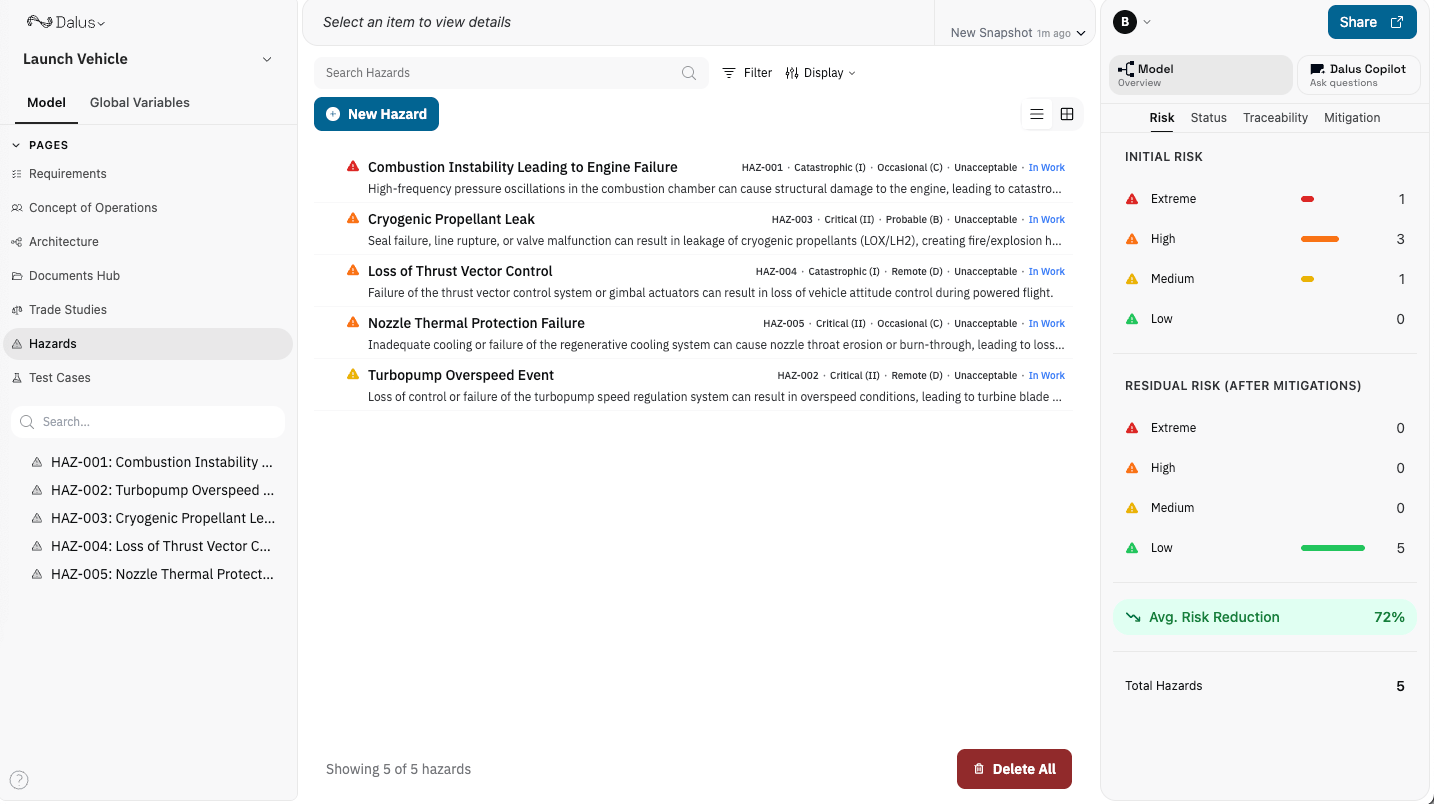
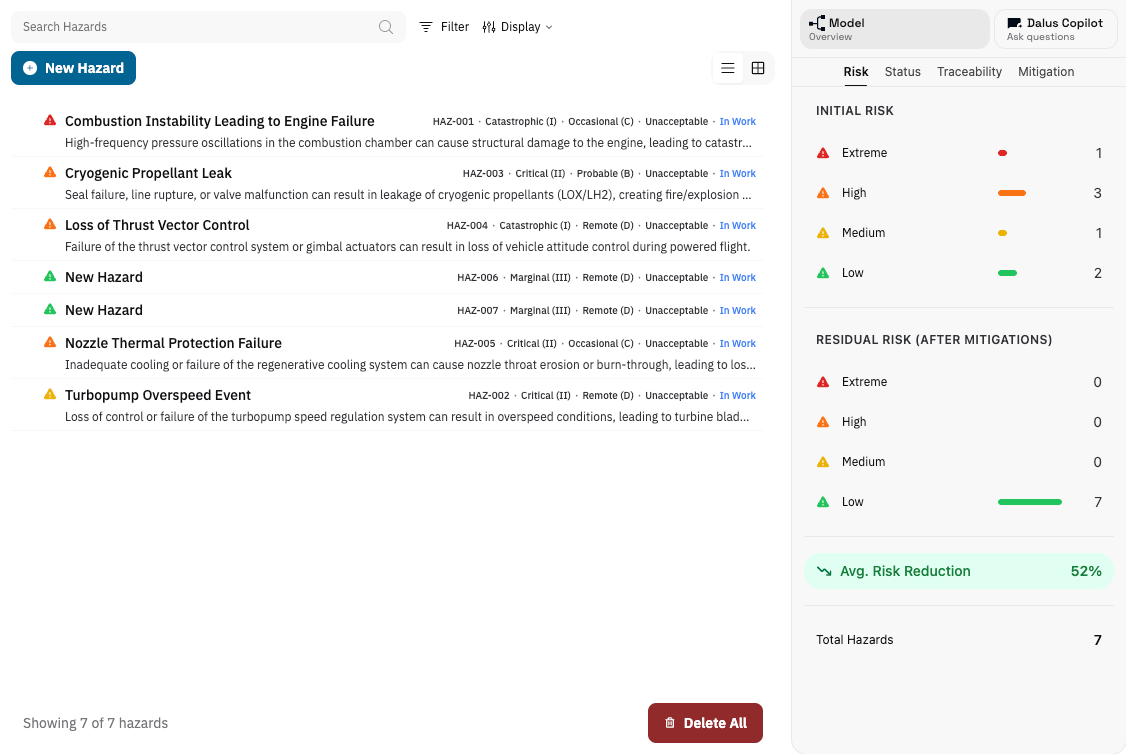
Open the Hazards page from the left sidebar. The page displays all identified hazards with their risk levels, and you can switch between list view and risk matrix view.
 ## Creating a Hazard
1. Click **New Hazard** to create a new hazard record.
2. Enter a descriptive name (e.g., "Battery thermal runaway").
3. Add a description explaining the hazardous condition.
Each hazard automatically receives a sequential ID (HAZ-001, HAZ-002, etc.) for traceability.
## Risk Assessment
Every hazard is assessed using two dimensions that combine to determine the overall risk level.
### Severity Levels
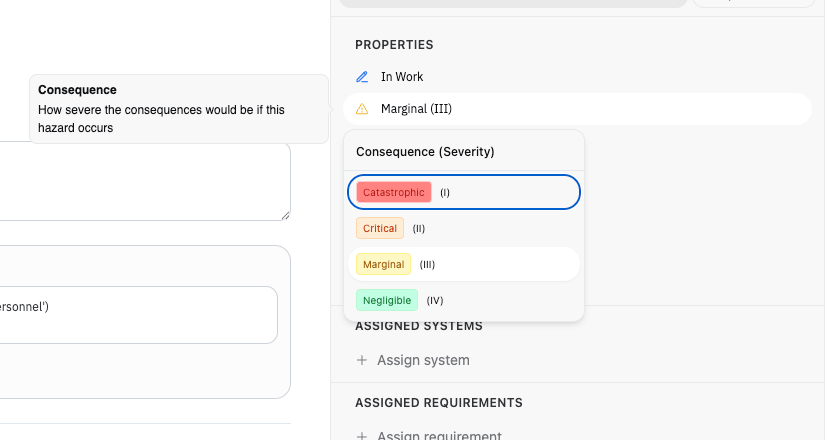
How bad could the outcome be?
| Level | Description |
| ---------------- | ----------------------------------------------- |
| **Catastrophic** | Death, system loss, severe environmental damage |
| **Critical** | Severe injury, major system damage |
| **Marginal** | Minor injury, minor system damage |
| **Negligible** | Less than minor injury or damage |
## Creating a Hazard
1. Click **New Hazard** to create a new hazard record.
2. Enter a descriptive name (e.g., "Battery thermal runaway").
3. Add a description explaining the hazardous condition.
Each hazard automatically receives a sequential ID (HAZ-001, HAZ-002, etc.) for traceability.
## Risk Assessment
Every hazard is assessed using two dimensions that combine to determine the overall risk level.
### Severity Levels
How bad could the outcome be?
| Level | Description |
| ---------------- | ----------------------------------------------- |
| **Catastrophic** | Death, system loss, severe environmental damage |
| **Critical** | Severe injury, major system damage |
| **Marginal** | Minor injury, minor system damage |
| **Negligible** | Less than minor injury or damage |
 ### Likelihood Levels
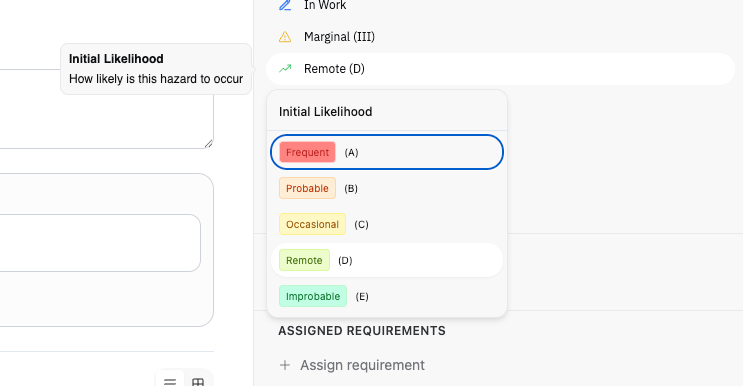
How often might this occur?
| Level | Code | Description |
| -------------- | ---- | ------------------------ |
| **Frequent** | A | Likely to occur often |
| **Probable** | B | Will occur several times |
| **Occasional** | C | Likely to occur sometime |
| **Remote** | D | Unlikely but possible |
| **Improbable** | E | Very unlikely to occur |
### Likelihood Levels
How often might this occur?
| Level | Code | Description |
| -------------- | ---- | ------------------------ |
| **Frequent** | A | Likely to occur often |
| **Probable** | B | Will occur several times |
| **Occasional** | C | Likely to occur sometime |
| **Remote** | D | Unlikely but possible |
| **Improbable** | E | Very unlikely to occur |
 ### Risk Matrix
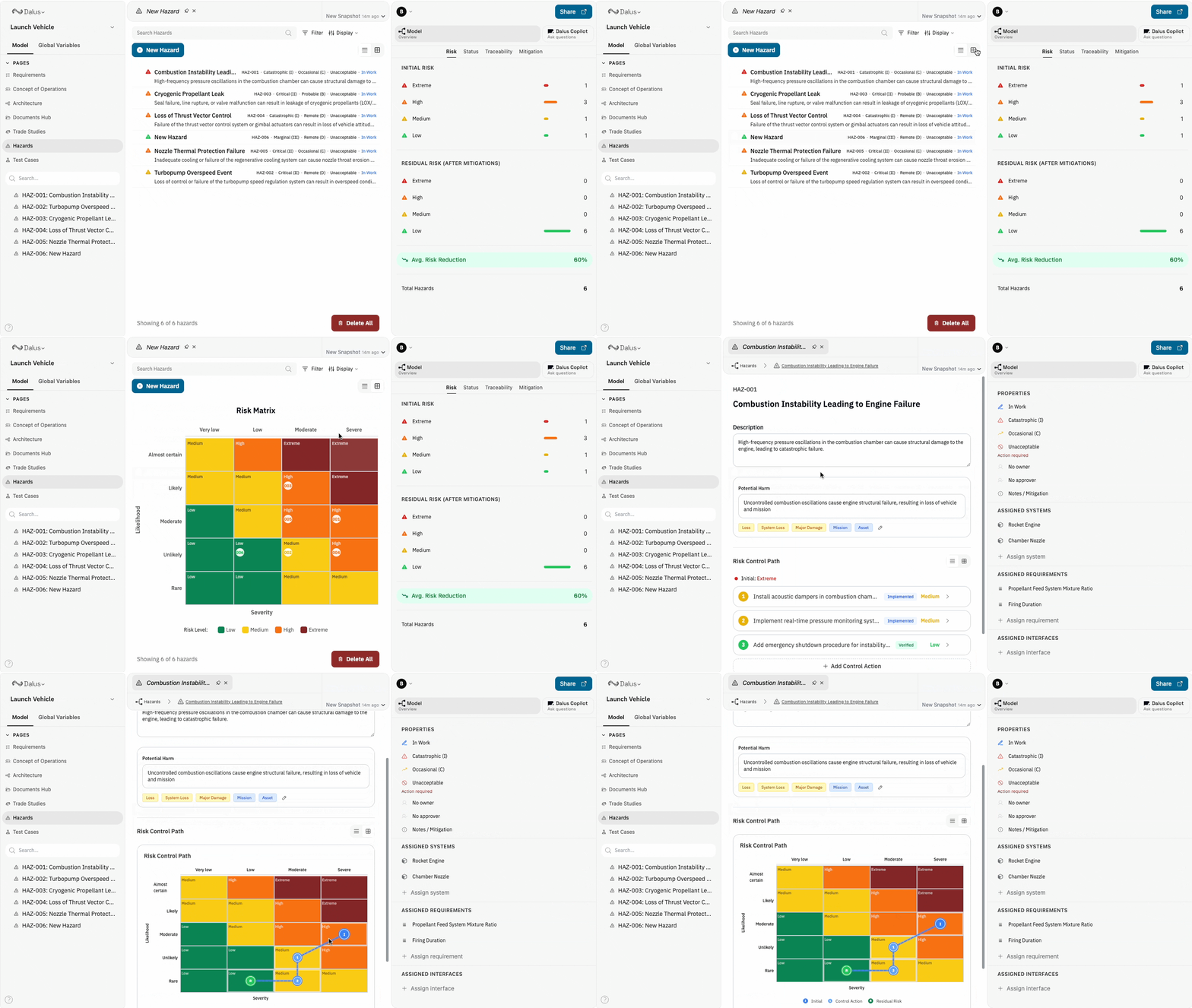
Severity and likelihood combine in a 5×4 matrix to determine the risk level:
| Risk Level | Color | Meaning |
| ----------- | ------ | ------------------------------------------------- |
| **Extreme** | Red | Unacceptable — must eliminate or reduce |
| **High** | Orange | Undesirable — senior management decision required |
| **Medium** | Yellow | Tolerable with review |
| **Low** | Green | Acceptable |
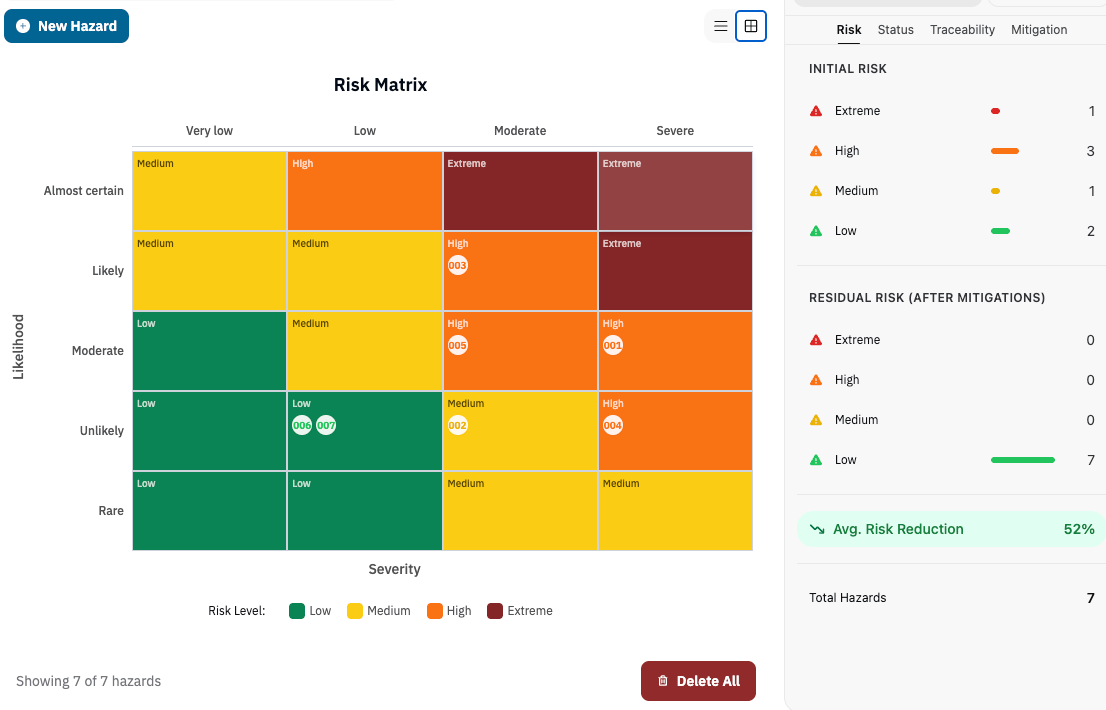
Use the **Matrix View** toggle to see all hazards plotted on the risk matrix. Click any hazard to see its mitigation path traced across the matrix.
### Risk Matrix
Severity and likelihood combine in a 5×4 matrix to determine the risk level:
| Risk Level | Color | Meaning |
| ----------- | ------ | ------------------------------------------------- |
| **Extreme** | Red | Unacceptable — must eliminate or reduce |
| **High** | Orange | Undesirable — senior management decision required |
| **Medium** | Yellow | Tolerable with review |
| **Low** | Green | Acceptable |
Use the **Matrix View** toggle to see all hazards plotted on the risk matrix. Click any hazard to see its mitigation path traced across the matrix.
 ## Potential Harm Classification
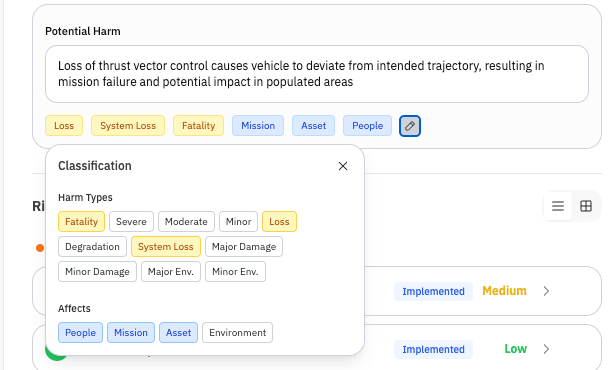
Beyond the hazard condition itself, document what harm could result:
### Harm Types
* Fatality
* Severe injury
* Moderate injury
* Minor injury
* Mission loss
* System loss
* Major damage
* Minor damage
* Environmental damage
### Loss Domains
Who or what is affected:
* **People** — Personnel safety
* **Mission** — Operational objectives
* **Asset** — Equipment and systems
* **Environment** — Environmental impact
## Potential Harm Classification
Beyond the hazard condition itself, document what harm could result:
### Harm Types
* Fatality
* Severe injury
* Moderate injury
* Minor injury
* Mission loss
* System loss
* Major damage
* Minor damage
* Environmental damage
### Loss Domains
Who or what is affected:
* **People** — Personnel safety
* **Mission** — Operational objectives
* **Asset** — Equipment and systems
* **Environment** — Environmental impact
 ## Risk Control Path
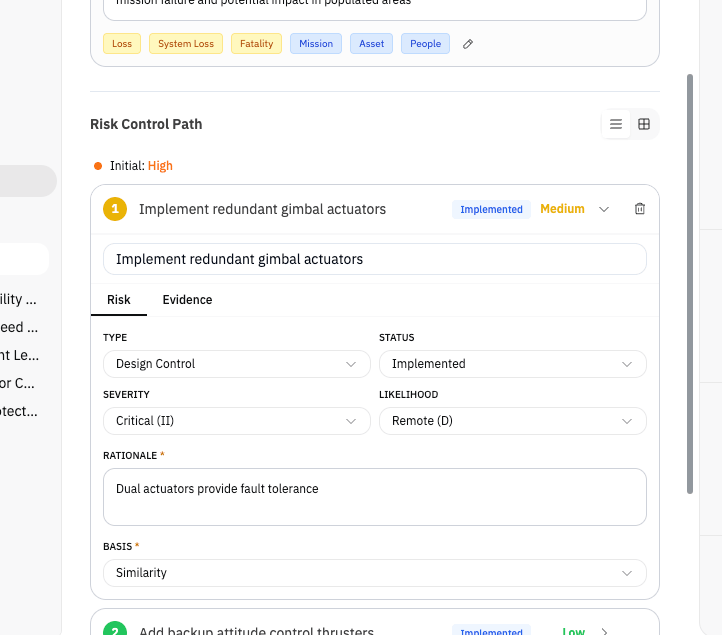
The Risk Control Path shows how controls reduce risk from the initial assessment to the residual (final) level. Each control action is added in order of effectiveness.
### Adding Control Actions
1. Click **Add Control** in the Risk Control Path section.
2. Select the control type from the hierarchy of controls.
3. Enter the resulting severity and likelihood *after* this control is applied.
4. Document the rationale explaining why this control reduces risk.
## Risk Control Path
The Risk Control Path shows how controls reduce risk from the initial assessment to the residual (final) level. Each control action is added in order of effectiveness.
### Adding Control Actions
1. Click **Add Control** in the Risk Control Path section.
2. Select the control type from the hierarchy of controls.
3. Enter the resulting severity and likelihood *after* this control is applied.
4. Document the rationale explaining why this control reduces risk.
 ### Control Type Hierarchy
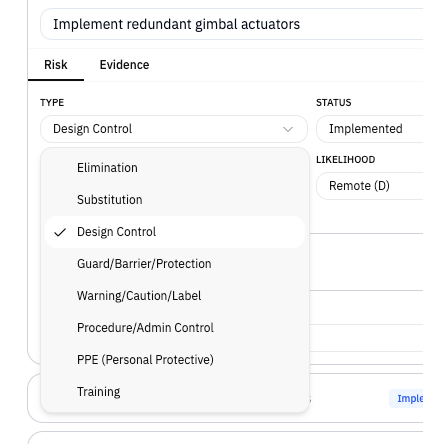
Controls are ordered by effectiveness (most effective first):
| Type | Description | Example |
| ---------------- | --------------------------------------- | -------------------------------------- |
| **Elimination** | Remove the hazard entirely | Redesign to eliminate the failure mode |
| **Substitution** | Replace with less hazardous alternative | Use non-flammable materials |
| **Design** | Engineer out the risk | Add redundant systems |
| **Guard** | Physical barriers or interlocks | Install protective covers |
| **Warning** | Alerts and indicators | Add caution labels, alarms |
| **Procedure** | Administrative controls | Operating procedures, checklists |
| **PPE** | Personal protective equipment | Require safety gear |
| **Training** | Knowledge and skills | Operator certification |
### Control Type Hierarchy
Controls are ordered by effectiveness (most effective first):
| Type | Description | Example |
| ---------------- | --------------------------------------- | -------------------------------------- |
| **Elimination** | Remove the hazard entirely | Redesign to eliminate the failure mode |
| **Substitution** | Replace with less hazardous alternative | Use non-flammable materials |
| **Design** | Engineer out the risk | Add redundant systems |
| **Guard** | Physical barriers or interlocks | Install protective covers |
| **Warning** | Alerts and indicators | Add caution labels, alarms |
| **Procedure** | Administrative controls | Operating procedures, checklists |
| **PPE** | Personal protective equipment | Require safety gear |
| **Training** | Knowledge and skills | Operator certification |
 ### Control Status
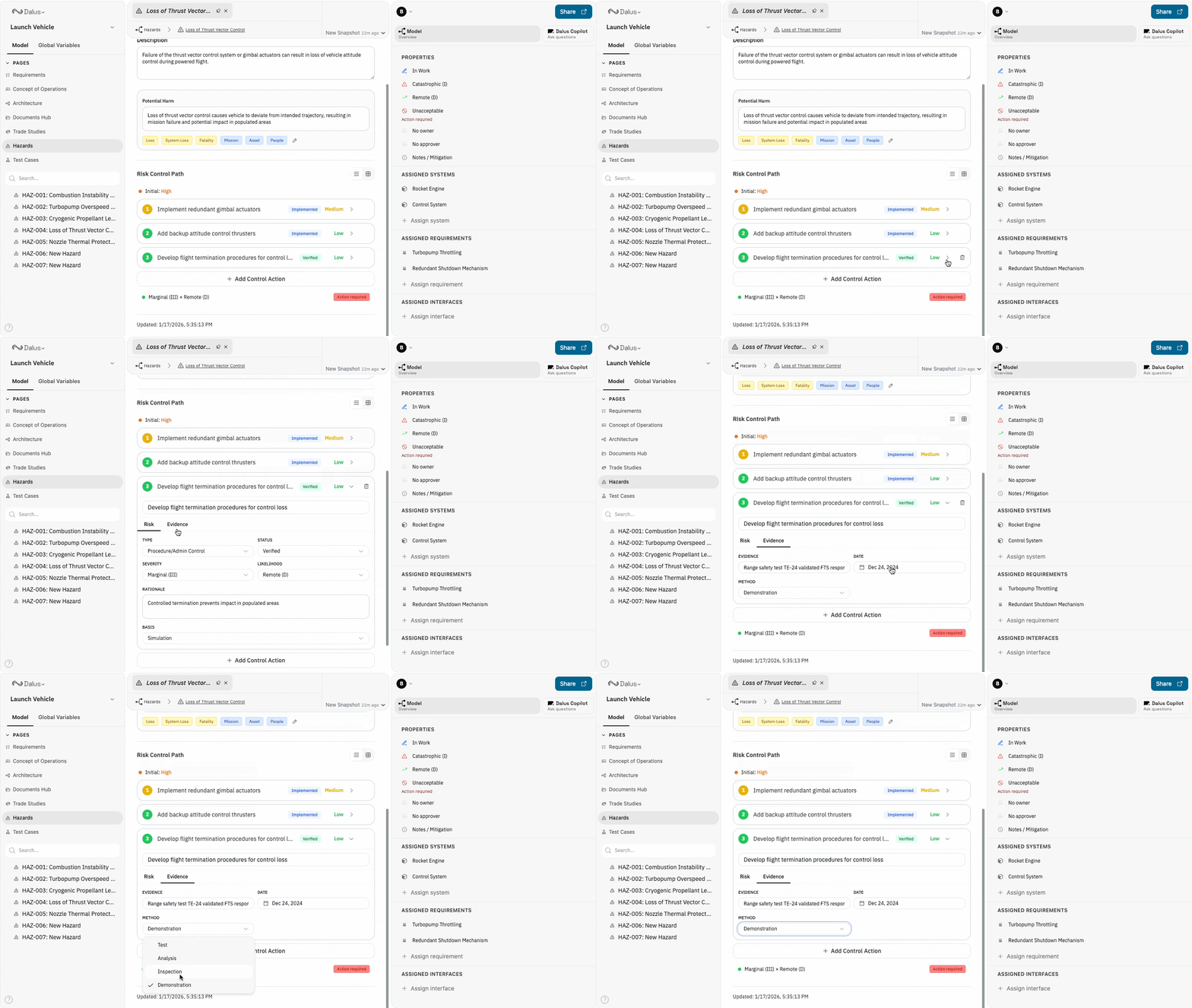
Track the implementation state of each control:
| Status | Meaning |
| --------------- | ------------------------------------------------ |
| **Planned** | Control identified but not yet implemented |
| **Implemented** | Control in place but not yet verified |
| **Verified** | Control verified effective through test/analysis |
### Verification Evidence
For verified controls, document:
* **Verification method** — Test, analysis, inspection, or demonstration
* **Verification date** — When verification was completed
* **Evidence reference** — Test report ID, analysis document, etc.
### Control Status
Track the implementation state of each control:
| Status | Meaning |
| --------------- | ------------------------------------------------ |
| **Planned** | Control identified but not yet implemented |
| **Implemented** | Control in place but not yet verified |
| **Verified** | Control verified effective through test/analysis |
### Verification Evidence
For verified controls, document:
* **Verification method** — Test, analysis, inspection, or demonstration
* **Verification date** — When verification was completed
* **Evidence reference** — Test report ID, analysis document, etc.
 ## Disposition
The disposition indicates the current risk acceptance state:
| Disposition | Meaning |
| ---------------- | -------------------------------------- |
| **Unacceptable** | Risk level requires action |
| **Controlled** | Controls in place but not yet accepted |
| **Accepted** | Risk formally accepted by authority |
| **Eliminated** | Hazard eliminated by design |
When accepting a residual risk, document:
* **Accepted by** — Name or role of accepting authority
* **Acceptance date** — When acceptance was granted
* **Rationale** — Why the residual risk is acceptable
* **Scope** — What configuration or version this applies to
## Traceability
### Assigned Systems
Link hazards to the Parts that could cause them or be affected. This maintains traceability between your safety analysis and system architecture.
### Mitigating Requirements
Link requirements that implement hazard controls. This ensures your requirements trace back to safety needs and vice versa.
### Interfaces
Link interfaces that are relevant to the hazard. This helps identify critical connections where hazards could propagate between system components.
## Views
### List View
The default view shows hazards as expandable cards with:
* Hazard ID and name
* Current risk level badge
* Severity and likelihood
* Disposition status
* Quick access to edit details
## Disposition
The disposition indicates the current risk acceptance state:
| Disposition | Meaning |
| ---------------- | -------------------------------------- |
| **Unacceptable** | Risk level requires action |
| **Controlled** | Controls in place but not yet accepted |
| **Accepted** | Risk formally accepted by authority |
| **Eliminated** | Hazard eliminated by design |
When accepting a residual risk, document:
* **Accepted by** — Name or role of accepting authority
* **Acceptance date** — When acceptance was granted
* **Rationale** — Why the residual risk is acceptable
* **Scope** — What configuration or version this applies to
## Traceability
### Assigned Systems
Link hazards to the Parts that could cause them or be affected. This maintains traceability between your safety analysis and system architecture.
### Mitigating Requirements
Link requirements that implement hazard controls. This ensures your requirements trace back to safety needs and vice versa.
### Interfaces
Link interfaces that are relevant to the hazard. This helps identify critical connections where hazards could propagate between system components.
## Views
### List View
The default view shows hazards as expandable cards with:
* Hazard ID and name
* Current risk level badge
* Severity and likelihood
* Disposition status
* Quick access to edit details
 ### Risk Matrix View
Toggle to the matrix view to see:
* All hazards plotted by severity (X-axis) and likelihood (Y-axis)
* Color-coded cells showing risk levels
* Mitigation paths showing how controls reduce risk
* Click hazards to see their control path traced across the matrix
### Risk Matrix View
Toggle to the matrix view to see:
* All hazards plotted by severity (X-axis) and likelihood (Y-axis)
* Color-coded cells showing risk levels
* Mitigation paths showing how controls reduce risk
* Click hazards to see their control path traced across the matrix
 ## Filtering and Search
Use the filter bar to narrow the hazard list by:
* **Risk Level** — Extreme, High, Medium, Low
* **Severity** — Catastrophic through Negligible
* **Likelihood** — Frequent through Improbable
* **Disposition** — Unacceptable, Controlled, Accepted, Eliminated
Search by hazard name or ID using the search bar.
## Best Practices
1. **Write clear hazard descriptions** — Describe the unsafe condition, not the consequence. "Battery overheating" not "Fire causes injury."
2. **Be consistent with severity/likelihood** — Use your organization's definitions or adopt MIL-STD-882 criteria.
3. **Document rationale for risk assessments** — Explain *why* you chose a particular severity or likelihood level.
4. **Apply controls in priority order** — Start with elimination and work down the hierarchy. Lower-tier controls should supplement, not replace, higher-tier ones.
5. **Verify controls before acceptance** — Don't accept residual risk until controls are verified effective.
6. **Maintain traceability** — Link hazards to affected Parts and mitigating Requirements for complete coverage.
## Permissions
Hazard management respects model permissions:
| Role | Can Create | Can Edit | Can Delete |
| ---------- | ---------- | -------- | ---------- |
| **Owner** | ✓ | ✓ | ✓ |
| **Admin** | ✓ | ✓ | ✓ |
| **Editor** | ✓ | ✓ | ✓ |
| **Viewer** | — | — | — |
Viewers can browse hazards but cannot modify them.
## Filtering and Search
Use the filter bar to narrow the hazard list by:
* **Risk Level** — Extreme, High, Medium, Low
* **Severity** — Catastrophic through Negligible
* **Likelihood** — Frequent through Improbable
* **Disposition** — Unacceptable, Controlled, Accepted, Eliminated
Search by hazard name or ID using the search bar.
## Best Practices
1. **Write clear hazard descriptions** — Describe the unsafe condition, not the consequence. "Battery overheating" not "Fire causes injury."
2. **Be consistent with severity/likelihood** — Use your organization's definitions or adopt MIL-STD-882 criteria.
3. **Document rationale for risk assessments** — Explain *why* you chose a particular severity or likelihood level.
4. **Apply controls in priority order** — Start with elimination and work down the hierarchy. Lower-tier controls should supplement, not replace, higher-tier ones.
5. **Verify controls before acceptance** — Don't accept residual risk until controls are verified effective.
6. **Maintain traceability** — Link hazards to affected Parts and mitigating Requirements for complete coverage.
## Permissions
Hazard management respects model permissions:
| Role | Can Create | Can Edit | Can Delete |
| ---------- | ---------- | -------- | ---------- |
| **Owner** | ✓ | ✓ | ✓ |
| **Admin** | ✓ | ✓ | ✓ |
| **Editor** | ✓ | ✓ | ✓ |
| **Viewer** | — | — | — |
Viewers can browse hazards but cannot modify them.